

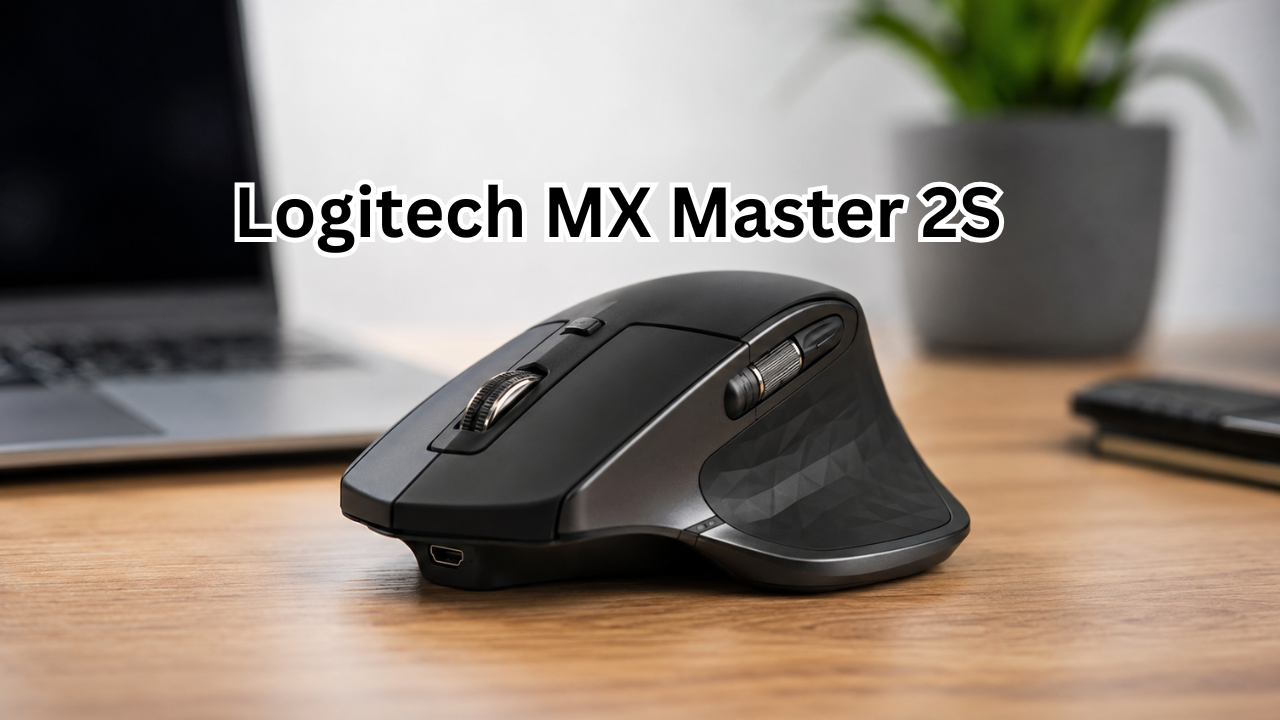
A good mouse can make a surprisingly big difference to the way you work. If you spend hours browsing the web, editing documents, managing spreadsheets, designing graphics, or moving between multiple computers, a basic mouse can quickly become frustrating. That is where the Logitech MX Master 2S built its reputation.
Although it is no longer the newest model in Logitech’s MX Master lineup, the MX Master 2S remains interesting because of its ergonomic shape, customizable controls, multi-device support, accurate sensor, and impressive battery life. It was designed primarily as a productivity mouse rather than a competitive gaming mouse, and that focus is still obvious today.
So, is the Logitech MX Master 2S still a smart choice? The answer depends largely on your priorities, hand size, budget, and whether you need the latest connectivity and charging features.
What Is the Logitech MX Master 2S?
The Logitech MX Master 2S is a premium wireless mouse aimed at people who want more control and comfort than a conventional office mouse provides.
Its design combines a large right-handed body with several additional controls, including a thumb wheel, back and forward buttons, a gesture button, and a scroll wheel with adjustable scrolling behavior. Logitech also included its Darkfield sensor, which supports sensitivity settings from 200 to 4,000 DPI.
One of its most useful features is the ability to connect with up to three computers. Users can switch between devices using the Easy-Switch functionality, while Logitech Flow can make moving between compatible computers much more seamless.
This makes the mouse particularly appealing to people who use a desktop and laptop side by side.
Logitech MX Master 2S Specifications
Before looking at everyday performance, it helps to understand what the mouse actually offers.
| Feature | Logitech MX Master 2S |
|---|---|
| Sensor | Darkfield |
| DPI range | 200–4,000 DPI |
| Weight | 145 g |
| Dimensions | 126 × 85.7 × 48.4 mm |
| Connectivity | Bluetooth Low Energy / 2.4 GHz Unifying |
| Devices | Up to 3 |
| Battery | 500 mAh rechargeable Li-Po |
| Claimed battery life | Up to 70 days |
| Charging port | Micro-USB |
| Scroll system | Speed-adaptive scroll wheel |
| Thumb controls | Thumb wheel + back/forward buttons |
| Software | Logitech Options at launch |
These specifications show that the MX Master 2S was built around productivity rather than portability or competitive gaming. Logitech lists a 145-gram weight, a 200–4,000 DPI range, a 500 mAh rechargeable battery, and up to 70 days of battery life.
Ergonomic Design and Comfort
Comfort is arguably one of the biggest reasons people choose an MX Master mouse.
The MX Master 2S has a substantial body that supports the palm rather than forcing the hand into a low, flat position. The thumb naturally rests along the side of the mouse, where the additional controls are located.
For long work sessions, this shape can feel much more comfortable than a small conventional mouse.
However, the large design is not automatically perfect for everyone. Users with smaller hands may find some of the buttons difficult to reach comfortably. Independent testing has also noted that the mouse’s size and weight can make it less suitable for small hands or people who want something easy to carry.
The 145-gram weight also gives the mouse a solid feel, but it means this is not an ultralight mouse.
Who Will Like the Shape?
The design is especially suitable for:
- Office professionals
- Writers and researchers
- Programmers
- Designers
- Video editors
- Students who work for long periods
- People with larger or medium-to-large hands
If you prefer a tiny mouse that disappears into a laptop bag, however, the MX Master 2S may feel bulky.
Tracking Performance
The Darkfield sensor is another major feature.
Logitech designed the sensor to provide precise tracking and lists a sensitivity range of 200 to 4,000 DPI, adjustable in 50-DPI increments.
For everyday productivity, 4,000 DPI is more than enough. Most office users will probably never need to operate at the maximum setting.
The bigger advantage is consistent tracking across different surfaces. The Darkfield technology was marketed around high-precision tracking, including difficult surfaces where conventional optical mice can struggle.
This makes the MX Master 2S versatile when you move between desks or workspaces.
The Scroll Wheel Is One of Its Best Features
Scrolling through long webpages, spreadsheets, documents, and project files can become tedious with an ordinary mouse.
The MX Master 2S addresses this with a speed-adaptive scroll wheel. It can provide controlled scrolling when you need precision and much faster scrolling when you need to move through large amounts of content. Logitech’s support documentation also identifies the mouse’s speed-adaptive wheel as one of its key controls.
There is also a thumb wheel on the side.
That secondary wheel is particularly useful for horizontal scrolling. If you regularly work with wide spreadsheets, timelines, large design canvases, or documents with horizontal movement, it can save a considerable amount of repetitive dragging.
Customizable Buttons and Gestures
Another reason the Logitech MX Master 2S became popular among productivity users is customization.
The mouse includes several controls beyond the standard left and right buttons. Its gesture button can be used with directional movements, while Logitech software allows supported controls to be assigned to different functions.
Depending on your workflow, you can use these controls for tasks such as:
- Switching applications
- Navigating webpages
- Zooming
- Managing windows
- Controlling media
- Performing document navigation
- Executing custom shortcuts
The benefit is not simply having more buttons. The real advantage is reducing the number of times you have to move your hand away from the mouse to reach the keyboard.
For repetitive professional workflows, that can add up.
Multi-Device Connectivity
The MX Master 2S was designed with multi-computer users in mind.
You can connect it with compatible devices using Bluetooth or Logitech’s 2.4 GHz Unifying receiver, depending on the version and setup. Logitech’s support documentation explains that the mouse can be configured for up to three computers using the Easy-Switch functionality.
This is useful if your desk includes:
- A Windows desktop
- A work laptop
- A MacBook
- A second personal computer
Instead of keeping separate mice for every machine, one mouse can handle multiple systems.
Logitech Flow
Logitech Flow takes the multi-device concept further. Compatible setups can allow the cursor to move between computers, and Flow can also support transferring content between systems.
Independent testing found Flow particularly useful for people working across multiple PCs or Macs, although setup and network configuration can affect the experience.
For someone who regularly jumps between two computers, this can be one of the MX Master 2S’s most valuable productivity features.
Battery Life
Battery life is another strong point.
Logitech rates the rechargeable 500 mAh battery for up to 70 days of use. The mouse also supports fast charging, with Logitech stating that a short three-minute charge can provide enough power for a full day of use.
That means you do not need to think about charging it every night.
The main downside is the charging connector. The MX Master 2S uses Micro-USB, which is an older standard compared with the USB-C connectors found on many modern devices.
If your desk has moved almost entirely to USB-C, you may find the older charging connection inconvenient.
Logitech MX Master 2S for Work and Productivity
This is where the mouse makes the most sense.
The combination of an ergonomic body, multiple programmable controls, a thumb wheel, accurate tracking, and multi-device support makes it particularly well suited to productivity.
For example, a writer might assign the side buttons to browser navigation. A designer could use custom shortcuts for common commands. A programmer might configure buttons for application switching or repetitive actions.
The mouse can also be useful for spreadsheet-heavy work because the horizontal thumb wheel provides a more convenient way to move sideways across large worksheets.
In other words, the MX Master 2S is not necessarily about making the cursor move faster. It is about reducing friction throughout the workday.
Is the MX Master 2S Good for Gaming?
It can handle casual gaming, but gaming is not its primary purpose.
The mouse is relatively heavy, and its design prioritizes comfort and productivity rather than the characteristics competitive gamers often seek. Independent testing similarly describes it as a strong office and productivity option but not an ideal choice for competitive gaming.
For strategy games, casual titles, simulation games, or general gaming, it can certainly work.
For competitive FPS gaming, however, a dedicated gaming mouse is generally a better choice because those products are designed around lighter weight, faster response characteristics, and gaming-specific controls.
Logitech MX Master 2S: Pros and Cons
Pros
- Comfortable ergonomic shape
- Excellent productivity-focused controls
- Useful thumb wheel
- Accurate Darkfield sensor
- Up to 4,000 DPI
- Supports up to three computers
- Bluetooth and Unifying connectivity options
- Excellent claimed battery life
- Customizable buttons and gestures
- Useful Logitech Flow functionality
Cons
- Relatively heavy at 145 grams
- Large body may not suit smaller hands
- Micro-USB charging feels outdated
- Not designed specifically for competitive gaming
- Some advanced functionality depends on Logitech software
- Newer MX Master models offer more modern hardware
Logitech MX Master 2S vs. Modern Alternatives
The MX Master 2S has been replaced by newer generations of Logitech’s productivity mice. That does not automatically make it useless.
In fact, its core concept remains relevant: ergonomic design, multi-device control, customization, and long battery life.
The real question is value.
If you find an MX Master 2S at a substantially lower price than a newer model and its older Micro-USB charging system does not bother you, it can still make sense.
On the other hand, if the price difference is small, a newer model may be more attractive because you get updated hardware and a longer runway of product support.
It is also worth remembering that the MX Master 2S is an older product. Independent testing notes that it has been replaced by the MX Master 3S.
Who Should Buy the Logitech MX Master 2S?
The mouse remains worth considering if your priorities are comfort and productivity rather than having the newest technology.
It can be a particularly good fit if you:
- Work at a desk for several hours a day
- Frequently use multiple computers
- Need horizontal scrolling
- Prefer a large ergonomic mouse
- Want programmable controls
- Spend a lot of time in browsers, documents, spreadsheets, or creative applications
- Find small mice uncomfortable
It is less attractive if you:
- Have very small hands
- Want an ultralight mouse
- Prefer USB-C charging
- Primarily play competitive games
- Need the latest generation of features

Is the Logitech MX Master 2S Still Worth It?
The answer depends on price and condition.
If you are buying a used or discounted Logitech MX Master 2S, inspect the physical condition carefully. Check the scroll wheel, buttons, thumb controls, charging port, and battery performance.
A well-maintained unit can still be a capable productivity mouse. Its core hardware remains practical, especially for office work and multi-computer setups.
But if the price approaches that of a newer MX Master model, the older 2S becomes harder to recommend.
The strongest reason to buy it today is therefore value, not novelty.
Frequently Asked Questions
Is the Logitech MX Master 2S good for office work?
Yes. Office productivity is one of its strongest use cases. Its ergonomic design, customizable controls, horizontal thumb wheel, and multi-device functionality are particularly useful for long work sessions.
How long does the MX Master 2S battery last?
Logitech rates the rechargeable battery for up to 70 days, although real-world battery life varies according to usage and settings. Logitech also states that a three-minute charge can provide enough power for a full day of use.
Can the MX Master 2S connect to multiple computers?
Yes. The mouse supports up to three computers through its Easy-Switch functionality. Compatible setups can also use Logitech Flow for moving between computers.
Is the MX Master 2S suitable for gaming?
It is suitable for casual gaming, but it is not an ideal choice for competitive gaming. Its relatively heavy body and productivity-focused design make dedicated gaming mice a better option for fast-paced competitive titles.
Does the MX Master 2S work with Windows and Mac?
Yes. Logitech lists support for Windows and macOS, with requirements varying according to whether Bluetooth or the Unifying receiver is used.
Does the MX Master 2S use USB-C?
No. The MX Master 2S uses Micro-USB for charging. This is one of its clearest disadvantages compared with newer mice.
Final Thoughts
The Logitech MX Master 2S may no longer be the newest productivity mouse, but its fundamental strengths have aged well. Its comfortable shape, accurate Darkfield sensor, useful thumb controls, customizable buttons, multi-device connectivity, and strong battery life still make it an appealing option for desk-based work.
Its weaknesses are equally clear. The 145-gram body is heavy for users accustomed to modern lightweight mice, smaller hands may struggle with the large design, and Micro-USB charging feels dated. It is also better suited to productivity than competitive gaming.
Ultimately, the MX Master 2S is best viewed as a proven productivity tool rather than a cutting-edge mouse. If you can find one at a good price and value comfort and workflow customization, it can still be a very capable choice. If you are paying close to the price of a current-generation model, however, comparing the newer option is likely the smarter move.
For anyone who spends most of the day working at a computer, the real appeal of the MX Master 2S is simple: it is designed to make everyday tasks feel easier, smoother, and less repetitive.
Also Read : Best Deck Builders: How to Choose the Right Professional for Your Outdoor Space









Leave a Reply