

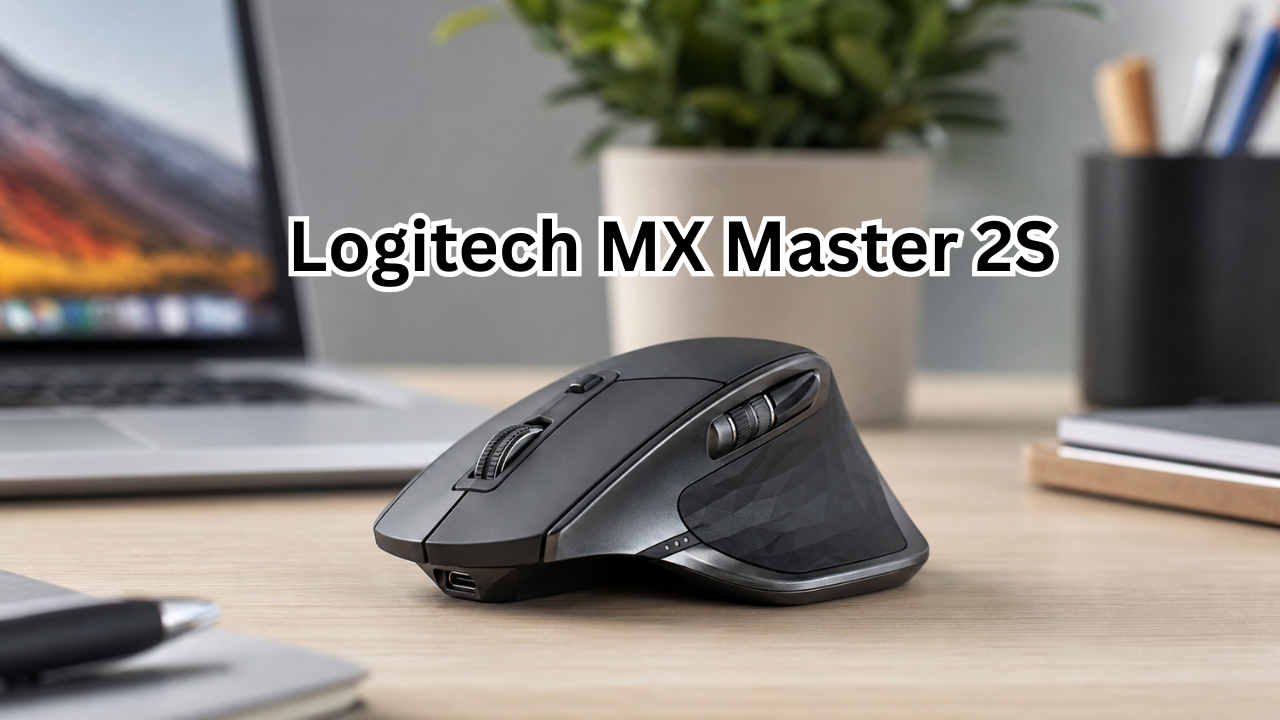
The Logitech MX Master 2S has earned a strong reputation as a productivity-focused wireless mouse for people who spend long hours working on a computer. Although newer MX Master models are now available, the 2S remains interesting because of its comfortable ergonomic shape, customizable controls, multi-device support, and excellent battery life.
Unlike gaming mice that prioritize extremely high polling rates and lightweight designs, the MX Master 2S is built around productivity. It is designed for office work, browsing, creative applications, programming, and multitasking across multiple computers.
So, is the Logitech MX Master 2S still a smart choice today? This guide covers its important features, specifications, strengths, weaknesses, and the types of users who may benefit most from it.
What Is the Logitech MX Master 2S?
The Logitech MX Master 2S is a wireless ergonomic mouse designed primarily for productivity. It combines a sculpted right-handed shape with multiple programmable controls, a high-precision Darkfield sensor, a rechargeable battery, and support for both Bluetooth and Logitech’s Unifying wireless receiver.
The mouse measures approximately 126 mm long, 85.7 mm wide, and 48.4 mm high, with a weight of 145 grams. Logitech lists a 500 mAh rechargeable Li-Po battery and up to 70 days of battery life on a full charge.
One of its most useful characteristics is flexibility. You can connect it wirelessly and customize its controls to match the applications and tasks you use most often.

Logitech MX Master 2S Specifications
Here is a quick overview of the major specifications:
| Feature | Logitech MX Master 2S |
|---|---|
| Sensor | Darkfield high-precision |
| DPI range | 200–4,000 DPI |
| DPI adjustment | 50 DPI increments |
| Connectivity | Bluetooth 4.0 and 2.4 GHz Unifying receiver |
| Battery | 500 mAh rechargeable Li-Po |
| Claimed battery life | Up to 70 days |
| Fast charging | About 1 minute for up to 2 hours of use |
| Weight | 145 g |
| Dimensions | 126 × 85.7 × 48.4 mm |
| Scroll wheel | Yes, with automatic shifting |
| Software | Logitech Options / supported Logitech software |
| Multi-computer feature | Logitech Flow |
| Orientation | Right-handed |
These specifications come from Logitech’s support documentation. Actual battery life can vary depending on usage and computing conditions.
Ergonomic Design and Comfort
One of the biggest reasons people choose the Logitech MX Master 2S is its shape.
The mouse has a large, sculpted design intended for a right-handed grip. Your palm rests naturally across the body, while the thumb area provides additional support and access to the thumb controls.
For office users, this can make a noticeable difference. A mouse that feels comfortable during a few minutes of use may not necessarily remain comfortable after several hours. The MX Master 2S was designed with extended productivity sessions in mind.
Its 145-gram weight also gives it a substantial feel. That is useful for controlled movements and everyday productivity, although users who prefer extremely lightweight mice may find it heavier than modern alternatives.
Who Will Like the Shape?
The ergonomic design is particularly appealing to:
- Office professionals
- Writers and researchers
- Programmers
- Designers
- Video editors
- Students
- People who prefer palm or relaxed grips
- Users with larger hands
However, the shape is not universal. Left-handed users cannot take full advantage of the mouse’s right-handed ergonomic design.
Darkfield Sensor and Tracking Performance
The MX Master 2S uses Logitech’s Darkfield high-precision sensor. Its adjustable sensitivity ranges from 200 to 4,000 DPI, with settings available in 50 DPI increments.
This is more than enough range for normal productivity work. Most people do not need extremely high DPI settings when writing documents, managing spreadsheets, browsing websites, or editing photos.
The Darkfield technology is another useful advantage. Reviews have noted that the sensor can track effectively across surfaces where conventional sensors may struggle, including glass and other challenging materials.
That does not mean every surface will produce identical results, but it gives the MX Master 2S considerable flexibility when you do not want to depend on a traditional mouse pad.
Logitech Flow: A Major Productivity Feature
One of the most interesting features of the Logitech MX Master 2S is Logitech Flow.
Flow allows the mouse to work across multiple computers and lets you move the pointer between supported systems. It can be particularly useful if you regularly work with two or more computers.
For example, imagine having a desktop computer and a laptop on the same desk. Instead of reaching for another mouse or manually switching devices every time you move between systems, Flow can make the transition much smoother.
Supported workflows can also include transferring text and files between computers, depending on the software and operating-system setup.
This feature makes the MX Master 2S particularly attractive to multitaskers. A writer could keep research on one computer and a document on another, while a designer could move between a workstation and laptop without constantly changing peripherals.
Customizable Buttons and Controls
The MX Master 2S provides several controls that can be customized through Logitech software.
This is where the mouse becomes more than a basic pointing device. Instead of using every button only for its default function, you can configure supported controls for actions that match your workflow.
For example, depending on the application and software configuration, customized controls can help with:
- Opening applications
- Navigating browser pages
- Switching tools
- Performing shortcuts
- Controlling media
- Moving through documents
- Managing creative applications
- Triggering frequently used commands
This can reduce the number of keyboard shortcuts you need to remember.
The mouse also includes a thumb-oriented gesture control, which can provide additional shortcuts when configured through supported Logitech software.
Scroll Wheel Experience
The main scroll wheel is another important part of the MX Master 2S experience.
It supports automatic shifting between traditional click-to-click scrolling and a faster free-spinning mode. This is useful when working with long documents, spreadsheets, websites, and large collections of information.
There is also a horizontal scroll function, which can be particularly convenient when working with wide spreadsheets, timelines, large design projects, or other interfaces where horizontal navigation is common.
For productivity users, these features can save time because you do not always need to rely on scroll bars or keyboard controls.
Battery Life and Charging
Battery life is one of the strongest aspects of the Logitech MX Master 2S.
Logitech rates its rechargeable 500 mAh battery for up to 70 days on a full charge. The company also states that a short one-minute charge can provide approximately two hours of use.
That quick-charge capability is useful when you discover that the battery is low just before an important work session.
Of course, real-world battery performance depends on factors such as usage patterns, connection method, battery condition, and the age of the mouse. Older units may also have reduced battery capacity after years of repeated charging.
Connectivity Options
The MX Master 2S supports two primary wireless connection methods: Bluetooth and Logitech’s 2.4 GHz Unifying receiver.
This gives users some flexibility depending on their computer.
Bluetooth can be convenient when you want to avoid using a USB receiver. The Unifying receiver, meanwhile, can be useful with compatible Logitech peripherals and computers that have an available USB port.
The mouse was designed for a wireless operating distance of around 10 meters under suitable conditions, according to Logitech’s published specifications.
Logitech MX Master 2S for Work and Productivity
For productivity, the MX Master 2S remains one of the more feature-rich older wireless mice.
Its strengths become particularly obvious when performing tasks that involve frequent navigation.
Office Work
The comfortable shape, programmable controls, and smooth scrolling make it suitable for documents, email, spreadsheets, and web applications.
Programming
Developers can benefit from customizable buttons and horizontal scrolling, especially when working with multiple windows, code editors, documentation, and browser tabs.
Graphic Design
The Darkfield sensor and programmable controls can make the mouse useful for applications such as Photoshop, Illustrator, and similar creative software.
However, professional designers who need extremely precise specialized input may still prefer a dedicated graphics tablet or newer productivity mouse.
Video Editing
Horizontal scrolling can be helpful when navigating timelines, while programmable controls can be assigned to frequently used commands.
Is the Logitech MX Master 2S Good for Gaming?
The MX Master 2S can handle casual gaming, but gaming is not its primary purpose.
Its heavier body, productivity-oriented design, and relatively modest sensor specifications make it less appropriate for competitive gaming than a purpose-built gaming mouse.
Modern gaming mice can offer significantly higher polling rates, lower weights, specialized switches, and sensors designed specifically for fast competitive movement.
For casual games, strategy titles, simulation games, and general desktop use, however, the MX Master 2S can still be perfectly usable.
Advantages and Disadvantages
Before buying one, it helps to consider both sides.
Pros
- Comfortable ergonomic right-handed design
- Excellent productivity-focused controls
- Darkfield sensor with up to 4,000 DPI
- Bluetooth and Unifying receiver connectivity
- Logitech Flow multi-computer functionality
- Long advertised battery life
- Fast charging capability
- Horizontal scrolling
- Customizable controls
- Suitable for many different work environments
Cons
- Relatively heavy compared with many modern mice
- Designed for right-handed users
- Not an ideal choice for competitive gaming
- Older micro-USB charging hardware
- Some newer MX Master models offer updated features
- Long-term wear can become an issue on older units
The last point matters when buying a used or heavily discounted MX Master 2S. Community reports from long-term owners show that some older units can develop wear around the rubber surfaces, scroll wheel, or other components after years of use.
Logitech MX Master 2S vs. Newer MX Master Models
The MX Master 2S still has many useful features, but newer generations have introduced improvements.
For example, newer MX Master models can offer updated connectivity, newer sensors, revised scroll-wheel technology, USB-C charging, quieter clicks, and higher maximum DPI depending on the model.
That does not automatically make the 2S a bad purchase.
If you already own an MX Master 2S and it works well, there may be little reason to replace it simply because a newer model exists. On the other hand, if you are buying a mouse for the first time, the price difference between an older 2S and a current model should be considered carefully.
The right choice often depends on the deal rather than the age of the product alone.
What to Check Before Buying a Logitech MX Master 2S
Because the MX Master 2S is an older model, buyers should pay particular attention to its condition.
If purchasing a used unit, check:
- Battery performance
- Charging port condition
- Scroll wheel operation
- Left- and right-click responsiveness
- Thumb button functionality
- Surface coating and rubber condition
- Bluetooth connection
- Unifying receiver availability
- Sensor tracking
- General physical wear
If buying new old stock, verify that the product is genuine and that the package includes the required accessories.
It is also worth checking software compatibility before purchase, especially if you use a newer operating system.
Is the Logitech MX Master 2S Still Worth It?
The answer depends heavily on price and your priorities.
For someone who wants a comfortable productivity mouse with multi-device functionality, customizable controls, excellent scrolling, and long battery life, the MX Master 2S can still make sense.
Its age becomes more noticeable when compared directly with newer MX Master products. USB-C charging, updated wireless technology, improved sensors, quieter switches, and newer software support can make a newer model more attractive for some buyers.
Still, the fundamental concept behind the MX Master 2S remains strong. It was built to improve productivity rather than chase gaming specifications, and that focus continues to make it useful.
If you find one at a good price and do not need the latest features, it can be a compelling option.
Frequently Asked Questions
Is the Logitech MX Master 2S still good in 2026?
Yes, it can still be a good productivity mouse in 2026, especially if you find it at a reasonable price and it is in good condition. Its ergonomic design, customizable controls, multi-computer support, and long battery life remain useful.
How long does the MX Master 2S battery last?
Logitech rates the rechargeable battery for up to 70 days on a full charge. It also states that approximately one minute of charging can provide up to two hours of use. Actual performance varies with usage and battery condition.
What DPI does the Logitech MX Master 2S support?
The MX Master 2S supports a DPI range from 200 to 4,000 DPI, with adjustments available in 50 DPI increments.
Can the MX Master 2S connect to multiple computers?
Yes. The mouse supports Logitech Flow, which allows compatible users to work across multiple computers and move between them more conveniently.
Is the MX Master 2S suitable for gaming?
It can handle casual gaming, but it is primarily a productivity mouse. Competitive gamers will generally benefit more from a dedicated gaming mouse with a lighter design, faster polling, and gaming-oriented controls.
Does the MX Master 2S work with Bluetooth?
Yes. Logitech lists Bluetooth 4.0 as one of its supported wireless connection methods, alongside the 2.4 GHz Unifying receiver.
Final Thoughts
The Logitech MX Master 2S is an older mouse, but its age does not erase the qualities that made it popular. Its ergonomic shape, programmable controls, versatile scrolling, Darkfield sensor, wireless connectivity, and impressive advertised battery life make it a capable productivity tool.
The biggest question today is not whether the MX Master 2S is useful—it clearly can be. The more important question is whether its price makes sense compared with newer MX Master models.
For users who already own one and enjoy it, there is still plenty of life left in the design. For buyers considering a used or discounted unit, checking the battery and physical condition is essential.
Ultimately, the MX Master 2S remains best suited to people who value comfort, customization, and productivity over cutting-edge gaming performance. If those are your priorities, this classic Logitech mouse can still be a practical addition to a modern desk setup
Also Read : Best Deck Builders: How to Choose the Right Professional for Your Outdoor Space











Leave a Reply